
About a year ago, I published a series of blogs about building a DIY NAS(Network Attached Storage) which have been a pretty popular series of articles, judging by the traffic they see. Looking at my Google Analytics, many of the search queries that drive traffic to my blogs seem to be from people who want to do something similar. Since my original articles are now quite old, I thought it would be a good subject for an additional article to write about building a NAS for 2013.
So far, I couldn’t be happier with my NAS. I use it primarily for the backups of all of our PCs. Additionally, I upgraded my computer at the end of 2012 and the NAS came in pretty handy there in holding backups and offloading nearly 2 terabytes’ worth of media storage onto the NAS.

If a friend were building a NAS today, I would suggest very much that he go the same route that I went: to start with FreeNAS and then to either use spare PC parts lying around the house or to build a new PC using inexpensive, low-power parts and as many hard drives as he could afford. Assuming my friend didn’t have a cache of spare PC parts like I seem to perpetually have, here’s a summary of new parts that I’d suggest:
Motherboard & CPU
 When originally searching for a motherboard, I was looking for a few factors: Mini-ITX, lots of SATA ports, integrated CPU, no fans and most importantly, inexpensive. I completely hit the jackpot when I found the ASUS C60M1-I AMD Fusion APU C-60. Unfortunately, many readers have pointed out since then that this board has turned into a sort of unicorn it’s difficult to find at any vendors and probably isn’t being made any longer.
I have been periodically updating this blog and researching available the motherboards currently out on the market, hoping that lightning would strike twice. Unfortunately, I had a very difficult time finding what I was looking for. The inexpensive motherboards (less than $100) were deficient in one or more of those categories, most typically available SATA ports. And even the expensive motherboards (more than $150) had their own deficiencies, like fans or not enough SATA ports.
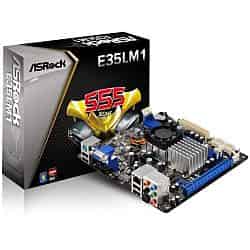
After some deliberation, I decided the best route to go would be to select an a motherboard and then optionally add on a SATA controller card to get to 6 SATA ports. This is due largely to the fact that the Mini-ITX motherboards with 6 SATA ports seem to start well over $150, which seemed like too much money to me. I wound up selecting the ASRock E35LM1 based on its price ($77.21) and its features. At this price it is a bit more expensive than the original motherboard. The motherboard features an integrated AMD E-240 APU processor, 4 SATA ports (6.0Gb/s) and an available PCI-express slot as a potential upgrade if additional drives were wanted. If you do decide to upgrade and add a SATA controller card, please make sure that you research their compatibility with FreeBSD (currently 9.1).
Even if you have a ton of spare PC parts lying around, this may wind up being a better deal in the long run. The power-sipping features of the Mini-ITX form factor mean your daily operational costs for running the NAS are going to be cheaper. In my original research, I determined that the amount of power the mini-ITX motherboard would save me over a traditional motherboard amounted to about $75.00 a year, which means combined, the motherboard & CPU would nearly pay for themselves in the first 12 months.
Running Total:$77.21
RAM
The hardware recommendations page for FreeNAS says that the 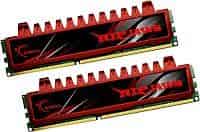 best way to get the most out of your FreeNAS box is to give it as much RAM as you can. The motherboard I picked can support up to 8GB of RAM, so I went ahead and priced out the maximum amount of memory that the motherboard would support. A two-piece set of the G.SKILL Ripjaws Series 4GB DDR3 1066 F3-8500CL7D-8GBRL would wind up costing $88.95.
Since originally publishing this article quite a few comments have asked why I choose non-ECC RAM so I consolidated my thoughts on non-ECC vs ECC for use with FreeNAS in another blog.
Running Total: $166.16
Case
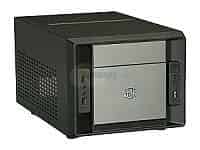 In my original build, the case is something I splurged on buying, a nice Lian-Li micro-ATX case. The case looks great in my office and I’m pretty happy with it. But this time around, I wanted to try and build an inexpensive NAS to show how much prices have fallen in the past year. Since I only bought four drives last year, I reduced the number of bays in my search criteria. The COOLER MASTER Elite 120 matches the criteria (mini-ITX, at least 4 drive bays, inexpensive) very well at $36.12. This case doesn’t come with a power supply, so I tacked on an additional $23.50 for a 250W mini-ITX power supply.
Running Total: $225.78
Storage
FreeNAS Drive
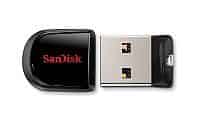 In a typical FreeNAS installation, the OS & FreeNAS is installed and configured on a separate drive than the actual storage drives for the NAS. The suggested drive for attaching FreeNAS is actually a USB drive. In my build, I wound up buying a USB header that I plugged right into the motherboard and then zip tied the thumb drive inside the case somewhere inconspicuous. I recently bought another USB storage device for holding my music library in the car and at it’s size it’s entirely unnecessary to install this in the case. It can plug right into one of the USB ports on the back of the computer without getting in the way. The SanDisk Cruzer Fit - 8GB is more than adequately sized to hold what’s needed for FreeNAS and it only costs $9.44.
Alternatively, check out the Brian’s Face 16GB USB Drive on Tindie for $12.00 or pre-loaded with the current FreeNAS ISO for $15.00.
Running Total: $235.22
NAS Drives
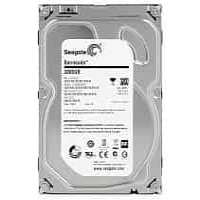
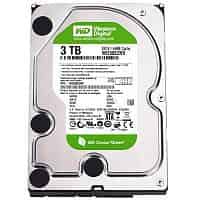
Here’s the meat and potatoes of any NAS build. If I recall correctly, my drives accounted for around 66% of the cost of my entire build last time around. This time, that percentage went up, because I didn’t splurge in some of the areas I splurged in for the last build. To reduce the impact of bad drives in particular batches, I wound up picking two of two different 3TB model drives:
| 2013 NAS HDDs | |
|---|---|
| Seagate Barracuda ST3000DM001 | Western Digital Caviar Green 3 TB WD30EZRX |
|
|
Update (01/29/2013): robvdl brings up a good point about the Western Digital drives in his comment below. I was previously unaware and researched a bit and have discovered this is an issue with WD Green and WD Black drives. However, I’ve been using two WD Green 2.0 TB drives in my FreeNAS box and haven’t had any issues so far in the year that I’ve been using it. The Western Digital Red 3.0 TB - WD30EFRX carries a heftier price tag of $134.36 (an additional $16.68 per drive). Based on my research and my experience, I would still buy the WD Green drives, but at the current prices, upgrading to the WD Red drives might be a worthwhile expense.
Update (01/22/2015): Just this month the online backup company, Backblaze, updated their study of the 40,000+ HDDs across their infrastructure. I was dismayed to find out that in the last year the Seagate ST3000DM001 which I recommended is a complete stinker. And by complete stinker, I mean failure rates in the range of 40.8% to 45.4%. And even more disappointing, there is a higher failure rate across all models of 3TB hard drives. Despite this blog being a little out of date, I wanted to make sure and update to warn people against using 3TB drives. My suggestion to add storage to this NAS would be to either buy more 2TB drives or consider 4TB drives like I did in the latest DIY NAS: 2015 Edition.
Altogether, these four drives account for an additional $475.34. Each drive is a bit cheaper then when I built my NAS, and they come with the added 1TB of additional space on each drive, for a total of 4 additional TBs. That’s a pretty significant boost in storage.
Final Price: $710.56
Conclusion
In 2012, I paid somewhere in the neighborhood of $850-$900 for the FreeNAS machine that I built from scratch . It wound up containing a total of 8TB of storage space. In February 2013 I priced out a comparable setup and found that prices had fallen dramatically enough that I could bring it up to 12 TB NAS for a total of $742.70. By October 2013, prices had slipped a bit on the drives, case, and power supply but were offset in price hikes on both the RAM and a similar motherboard. I would’ve really liked to have seen the prices fall enough that I could keep it around the same price while adding an additional 4TB like I did earlier this year. But that wasn’t in the cards this time around. Maybe by the time I replace this article in 2014, another significant step forward can be made in the total storage.